Category: AWS

Kata Containers vs gVisor: security and performance trade-offs

Running untrusted workloads in a multi-tenant Kubernetes cluster is one of the hardest security problems in modern cloud infrastructure. The default container runtime gives you Linux namespaces and cgroups — solid isolation for cooperative tenants, but a single kernel-level CVE can let a motivated attacker or agent escape a container on the node. Two projects take radically different approaches to closing that gap: Kata Containers wraps each pod in a lightweight virtual machine, while gVisor interposes a user-space kernel between the application and the host. This post is a ground-level engineering guide to help you choose between them for AI agent sandboxing, CI runners, multi-tenant function execution, or any workload where you cannot trust the code you are running.

Why stock runc Is Not Enough

The Linux kernel attack surface reachable from inside a container is enormous. Even with seccomp profiles, AppArmor, and a stripped-down capability set, the container shares the host kernel. A single exploitable bug in a syscall handler — dirty pipe (CVE-2022-0847), runc symlink-race (CVE-2019-5736), Netfilter UAF (CVE-2023-32233) — can escalate from inside a container to root on the host node. OWASP’s Top 10 for LLM Applications explicitly calls out LLM08: Excessive Agency and LLM04: Model Denial of Service as prime risks for agent runtimes executing tool calls, code, or shell commands on behalf of an LLM. Any agentic architecture that lets an LLM invoke arbitrary code without a strong isolation boundary is accepting kernel-level blast radius.

Kata Containers – Hardware VM Isolation

Kata Containers uses a real hypervisor (QEMU/KVM, Cloud Hypervisor, or Firecracker) to run each pod inside its own VM. The guest has its own kernel; the host kernel never sees the workload’s syscalls directly.

  • Containerd shim (containerd-shim-kata-v2) is the Kubernetes-side entry point — it speaks the standard OCI runtime interface.
  • A minimal guest kernel boots in <100 ms via a stripped initrd. Firecracker’s microVM gets this under 125 ms cold-start end-to-end.
  • The virtio-vsock channel connects the shim on the host to the kata-agent inside the VM — all container lifecycle operations flow through this channel.
  • Storage is presented via virtio-blk or virtiofs; networking via macvtap or tc-redirect-tap.
  • The only thing shared with the host is the hypervisor binary and its narrow VMM interface (MMIO, virtio ring buffers) — not the kernel.

Threat model: An attacker who escapes the guest kernel still faces the hypervisor boundary. Exploiting QEMU or Cloud Hypervisor is dramatically harder than a kernel syscall bug and requires a separate VMM vulnerability. Firecracker’s ~50 000-line Rust VMM further shrinks the attack surface by dropping legacy device models entirely.

gVisor – User-Space Syscall Interception

gVisor (Google’s open-source sandbox) implements a large subset of the Linux syscall ABI in Go — the Sentry. Instead of letting application syscalls reach the host kernel, the Sentry intercepts every call and re-implements it in user space. The host kernel only sees a narrow set of calls from the Sentry itself.

  • KVM platform: the Sentry runs as a guest in a VM context for each sandbox, using /dev/kvm to switch rings. This gives hardware-accelerated syscall interception without booting a full guest kernel. Memory overhead: ~20 MB per sandbox.
  • ptrace platform: purely software-based — the Sentry attaches to the sandboxed process via ptrace. Portable but significantly slower; only needed when KVM is unavailable (e.g., nested virtualization without hardware assist).
  • OCI integration: runsc is a drop-in OCI-compatible runtime, so runtimeClass: gvisor in a Kubernetes PodSpec is all you need.
  • The Gofer process mediates all filesystem access between the Sentry and the host, providing an additional isolation layer for path traversal and file descriptor leaks.

Threat model: An attacker inside a gVisor sandbox must exploit the Sentry (Go code, ~200 KLOC) rather than the kernel. The Sentry’s seccomp profile allows only ~50 host syscalls — compared to >400 exposed by a bare container. However, gVisor shares the host kernel (the Sentry’s calls still reach it), so a kernel CVE in one of those ~50 syscalls can still be exploitable.

Head-to-Head Comparison
DimensionKata ContainersgVisor (runsc)
Isolation MechanismHardware VM (KVM / QEMU, Cloud Hypervisor, Firecracker)User-space kernel (Sentry process, Go)
Kernel Shared With Host?No – guest has its own kernelYes – Sentry still calls host kernel (~50 syscalls)
Syscall InterceptionNone — guest kernel handles all app syscallsFull — Sentry re-implements every syscall in Go
Host Attack SurfaceVMM interface (virtio, MMIO) — very narrow~50 host syscalls from Sentry’s seccomp profile
Memory Overhead Per Pod~100–180 MB (guest kernel + initrd + agent)~20–40 MB (Sentry + Gofer processes)
Cold-Start Latency100–500 ms (Firecracker ≈ 125 ms; QEMU ≈ 300–500 ms)10–50 ms (KVM platform); 50–200 ms (ptrace)
Runtime PerformanceNear-native CPU; I/O overhead from virtio5–15% CPU overhead on syscall-heavy workloads; near-native for compute-bound
Syscall CompatibilityFull Linux ABI — anything the guest kernel supportsPartial — ~240 of ~400 syscalls implemented; gaps in io_uring, eBPF, some ioctls
Filesystemvirtio-blk / virtiofs — near-native throughputGofer-mediated 9P or overlay — higher latency on metadata-heavy workloads
NetworkingCNI via macvtap / tc-redirect-tap — full kernel netstack in guestSentry’s own netstack or passthrough — minor overhead
Kubernetes IntegrationruntimeClass: kata-containers via containerd shimruntimeClass: gvisor via runsc / containerd-shim-runsc
EKS SupportEKS with self-managed node groups; not on FargateEKS with self-managed nodes; GKE Sandbox (GA)
Privileged ContainersNot supported — by designNot supported — by design
eBPF / io_uringFull (host kernel features available to guest)Partial / none — major compatibility gap
Best ForMaximum isolation; multi-tenant LLM agent execution; regulated environmentsLow-overhead sandboxing; CI pipelines; serverless functions
Weakest LinkVMM CVE (rare); cold-start adds latencyHost kernel reachable via Sentry; syscall gaps break some workloads
Performance in Practice

For CPU-intensive tasks (ML inference, numerical computation, compilation), both runtimes approach native performance. Kata has essentially zero steady-state CPU overhead — the guest kernel is real. gVisor’s KVM platform imposes overhead only on syscall paths, so compute-bound loops run near-native speed.

gVisor’s overhead is proportional to syscall frequency. Workloads that issue thousands of syscalls per second — small file I/O, stat() storms, high-frequency network connections — can see 5–15× higher syscall latency versus native. Kata’s virtio I/O path typically stays within 2–3× of native for network and disk throughput.

Kata’s memory overhead (100–180 MB per pod baseline) is non-trivial on nodes running hundreds of sandboxes. gVisor’s ~20–40 MB Sentry footprint is significantly lighter. For high-density deployments — hundreds of short-lived agent sessions per node — gVisor’s footprint advantage is material.

Security Trade-offs

Kata provides stronger isolation: exploiting it requires breaking the hypervisor. gVisor requires breaking the Sentry or exploiting one of the ~50 host syscalls it allows. For threat models where the adversary attempts kernel escape — LLM-generated exploits, red-team scenarios, multi-tenant SaaS — Kata’s VM boundary is the more defensible choice.

gVisor’s seccomp profile for the Sentry allows ~50 host syscalls. Standard containers with a tight seccomp policy might allow 150–200. The Sentry’s Go implementation of the remaining ~350 syscalls constitutes its own attack surface. Kata sidesteps this entirely — the guest kernel is a full Linux kernel, not user-space emulation.

Choose Kata Containers When
  • Threat model includes motivated adversaries attempting kernel escape (LLM-generated exploits, multi-tenant SaaS, red-team scenarios)
  • Regulated environment (SOC 2, PCI, FedRAMP) where VM-level isolation is required by compliance
  • Full Linux ABI compatibility needed – eBPF programs, io_uring, kernel modules, raw sockets
  • Cold-start latency of 100–500 ms is acceptable, or you implement a warm-pool via Kubernetes CRDs
  • You can afford 100–180 MB baseline overhead per pod
Choose gVisor When
  • Low-latency cold starts (10-50 ms) for short-lived sandboxes are needed – CI jobs, serverless functions, per-request isolation
  • Memory density matters – hundreds of sandboxes per node, cannot afford 150+ MB per pod
  • Compute-bound workloads with infrequent syscalls (ML inference, data transformation)
  • Running on GKE with GKE Sandbox (gVisor GA)
  • Syscall compatibility validated for your specific workload

References: Kata Containers Architecture · gVisor Documentation · AWS Builder Hub: EKS Agent Sandboxes · OWASP Top 10 for LLM Applications · Firecracker MicroVM
Sizing an LLM for GPU memory

When choosing the EC2 instance for a Large Language Model, one of the first constraints is whether the model will fit in the GPU memory of an instance.

Given a choice of a model, the decisions roughly follow this path –

Model -> Training/Inferencing -> Technique (choice of optimization) -> Memory requirement -> Instance requirement -> Instance availability -> smaller instance or more optimization or distributed training.

Some extreme optimizations are possible such as QLora for Inferencing . See the blog How to fit a layer in memory at a time https://huggingface.co/blog/lyogavin/airllm . However many use cases do not want any sacrifices in accuracy.

Distributed training by splitting the model against smaller instances is another possibility. A discussion is here – https://siboehm.com/articles/22/pipeline-parallel-training

Here’s a listing of different GPU instance types with a column for GPU Memory (GiB) on one page to facilitate instance comparisons.

EC2 G3 Instance Details
NameGPUsvCPUMemory (GiB)GPU Memory (GiB)Price/hr* (Linux)Price/hr* (Windows)1-yr Reserved Instance Effective Hourly* (Linux)3-yr Reserved Instance Effective Hourly* (Linux)
g3s.xlarge1430.58$0.75
$0.93
$0.525$0.405
g3.4xlarge1161228$1.14$1.876$0.741$0.538
g3.8xlarge23224416$2.28$3.752$1.482$1.076
g3.16xlarge46448832$4.56$7.504$2.964$2.152
EC2 G4 Instance details
 Instance SizeGPUvCPUsMemory (GiB)Instance Storage (GB)Network Bandwidth (Gbps)EBS Bandwidth (Gbps)On-Demand Price/hr*1-yr Reserved Instance Effective Hourly* (Linux)3-yr Reserved Instance Effective Hourly* (Linux)

G4dn

Single GPU VMsg4dn.xlarge14161 x 125 NVMe SSDUp to 25Up to 3.5$0.526$0.316$0.210
g4dn.2xlarge18321 x 225 NVMe SSDUp to 25Up to 3.5$0.752$0.452$0.300
g4dn.4xlarge116641 x 225 NVMe SSDUp to 254.75$1.204$0.722$0.482
g4dn.8xlarge1321281 x 900 NVMe SSD509.5$2.176$1.306$0.870
g4dn.16xlarge1642561 x 900 NVMe SSD509.5$4.352$2.612$1.740
           
Multi GPU VMsg4dn.12xlarge4481921 x 900 NVMe SSD509.5$3.912$2.348$1.564
g4dn.metal8963842 x 900 NVMe SSD10019$7.824$4.694$3.130

G4ad

Single GPU VMsg4ad.xlarge14161 x 150 NVMe SSDUp to 10Up to 3$0.379$0.227$0.178
g4ad.2xlarge18321 x 300 NVMe SSDUp to 10Up to 3$0.541$0.325$0.254
g4ad.4xlarge116641 x 600 NVMe SSDUp to 10Up to 3$0.867$0.520$0.405
           
Multi GPU VMsg4ad.8xlarge2321281 x 1200 NVMe SSD153$1.734$1.040$0.810
g4ad.16xlarge4642561 x 2400 NVMe SSD256$3.468$2.081$1.619
EC2 G5 instance details
 Instance SizeGPUGPU Memory (GiB)vCPUsMemory (GiB)Storage (GB)Network Bandwidth (Gbps)EBS Bandwidth (Gbps)On Demand Price/hr*1-yr ISP Effective Hourly (Linux)3-yr ISP Effective Hourly (Linux)
Single GPU VMsg5.xlarge1244161×250Up to 10Up to 3.5$1.006$0.604$0.402
g5.2xlarge1248321×450Up to 10Up to 3.5$1.212$0.727$0.485
g5.4xlarge12416641×600Up to 258$1.624$0.974$0.650
g5.8xlarge124321281×9002516$2.448$1.469$0.979
g5.16xlarge124642561×19002516$4.096$2.458$1.638
            
Multi GPU VMsg5.12xlarge496481921×38004016$5.672$3.403$2.269
g5.24xlarge496963841×38005019$8.144$4.886$3.258
g5.48xlarge81921927682×380010019$16.288$9.773$6.515
EC2 G6 instance details
 Instance SizeGPUGPU Memory (GB)vCPUsMemory (GiB)Storage (GB)Network Bandwidth (Gbps)EBS Bandwidth (Gbps)On Demand Price/hr*1-yr ISP Effective Hourly (Linux)3-yr ISP Effective Hourly (Linux)
Single GPU VMs          g6.xlarge1244161×250Up to 10Up to 5$0.805$0.499$0.342
g6.2xlarge1248321×450Up to 10Up to 5$0.978$0.606$0.416
g6.4xlarge12416641×600Up to 258$1.323$0.820$0.562
g6.8xlarge124321282×4502516$2.014$1.249$0.856
g6.16xlarge124642562×9402520$3.397$2.106$1.443
Gr6 instances with 1:8 vCPU:RAM ratio
gr6.4xlarge124161281×600Up to 258$1.539$0.954$0.654
gr6.8xlarge124322562×4502516$2.446$1.517$1.040
            
Multi GPU VMsg6.12xlarge496481924×9404020$4.602$2.853$1.955
g6.24xlarge496963844×9405030$6.675$4.139$2.837
g6.48xlarge81921927688×94010060$13.35$8.277$5.674
EC2 G6e instances
Instance SizeGPUGPU Memory (GiB)  vCPUsMemory(GiB)Storage (GB)  Network Bandwidth (Gbps)  EBS Bandwidth (Gbps)
g6e.xlarge148432250Up to 20Up to 5
g6e.2xlarge148864450Up to 20Up to 5
g6e.4xlarge14816128600208
g6e.8xlarge148322569002516
g6e.16xlarge1486451219003520
g6e.12xlarge419248384380010020
g6e.24xlarge419296768380020030
g6e.48xlarge83841921536760040060
EC2 P3 instance details
Instance SizeGPUs – Tesla V100GPU Peer to PeerGPU Memory (GB)vCPUsMemory (GB)Network BandwidthEBS BandwidthOn-Demand Price/hr*1-yr Reserved Instance Effective Hourly*3-yr Reserved Instance Effective Hourly*
p3.2xlarge1N/A16861Up to 10 Gbps1.5 Gbps$3.06$1.99$1.05
p3.8xlarge4
NVLink643224410 Gbps7 Gbps$12.24$7.96$4.19
p3.16xlarge8NVLink1286448825 Gbps14 Gbps$24.48$15.91$8.39
p3dn.24xlarge8NVLink25696768100 Gbps19 Gbps$31.218$18.30$9.64
EC2 P4 instance details
Instance SizevCPUsInstance Memory (GiB)GPU – A100GPU memoryNetwork Bandwidth (Gbps)GPUDirect RDMAGPU Peer to PeerInstance Storage (GB)EBS Bandwidth (Gbps)On-demand Price/hr1-yr Reserved Instance Effective Hourly *3-yr Reserved Instance Effective Hourly *
p4d.24xlarge9611528320 GB
HBM2
400 ENA and EFAYes600 GB/s NVSwitch8 x 1000 NVMe SSD19$32.77$19.22$11.57
p4de.24xlarge (preview)9611528640 GB
HBM2e
400 ENA and EFAYes600 GB/s NVSwitch8 x 1000 NVMe SSD19$40.96$24.01$14.46
EC2 P5 instance details
Instance SizevCPUInstance Memory (TiB)GPU – H100GPU  MemoryNetwork BandwidthGPUDirectRDMAGPU Peer to PeerInstance Storage (TB)EBS Bandwidth (Gbps)
p5.48xlarge1928640 GB HBM33200 Gbps EFAv2Yes900 GB/s NVSwitch8 x 3.84 NVMe SSD80 
EC2 P5e instance details
Instance SizevCPUsInstance Memory (TiB)GPUGPU memoryNetwork Bandwidth (Gbps)GPUDirect RDMAGPU Peer to PeerInstance Storage (TB)EBS Bandwidth (Gbps)
p5e.48xlarge19228 x NVIDIA H2001128 GB
HBM3e
3200 Gbps EFAYes900 GB/s NVSwitch8 x 3.84 NVMe SSD80

Relevant links

P5e and P5en announcement (update Sep’24). https://aws.amazon.com/blogs/machine-learning/amazon-ec2-p5e-instances-are-generally-available/

https://en.wikipedia.org/wiki/List_of_Nvidia_graphics_processing_units

Use of Triton and NIM to make use of GPU memory across multiple GPUs on an instance –

https://github.com/aws-samples/amazon-eks-machine-learning-with-terraform-and-kubeflow

https://aws.amazon.com/blogs/hpc/deploying-generative-ai-applications-with-nvidia-nims-on-amazon-eks

FP4 and four bit integer quantization, and QLoRA

Making LLMs even more accessible with bitsandbytes, 4-bit quantization and QLoRA at https://huggingface.co/blog/4bit-transformers-bitsandbytes

[2305.14152] Memory-Efficient Fine-Tuning of Compressed Large Language Models via sub-4-bit Integer Quantization

Note: Performance is not just about GPU memory but also network bandwidth which is needed to load the large models especially for a platform serving multiple models.

When comparing the importance of high memory bandwidth between training and inference for Large Language Models (LLMs), it is generally more critical for training. Here’s why:

1. Training LLMs

  • Data Movement: Training LLMs involves frequent data movement between the GPU memory and the processing units. Each training iteration requires loading large batches of data, performing extensive matrix multiplications, and updating weights, all of which are memory-intensive operations.
  • Backward Pass: During the training phase, the backward pass (gradient computation and backpropagation) is highly memory bandwidth-intensive. The gradients of each layer are computed and propagated back through the network, requiring significant memory access.
  • Parameter Updates: High memory bandwidth is essential to handle the large volume of data being read and written during the parameter updates across multiple layers, especially in very deep models.
  • Larger Models and Datasets: Training large models like GPT-3 or GPT-4 involves massive datasets and millions (or even billions) of parameters, leading to a substantial demand for memory bandwidth.

2. Inferencing of LLMs:

  • Data Movement: During inference, the primary task is to process input data and generate outputs, which involves reading the model parameters and performing computations. While this still requires good memory bandwidth, the demands are generally lower compared to training.
  • No Backpropagation: Inference does not involve the backward pass or parameter updates, significantly reducing the need for continuous memory writes. The absence of gradient computations and updates reduces the overall memory bandwidth requirements.
  • Smaller Batch Sizes: Inference typically operates on smaller batch sizes compared to training, further reducing the demand for memory bandwidth.
  • Optimizations: Techniques such as model quantization and optimized inference runtimes (like TensorRT) can reduce the memory bandwidth required during inference by optimizing how data is accessed and processed.

EC2 P5 UltraClusters

Each P5 EC2 instances has

  • eight NVIDIA H100 GPUs capable of 16 petaFLOPs of mixed-precision performance
  • 640 GB of high-bandwidth memory, 80GB in each GPU
  • 3,200 Gbps networking connectivity (8x more than the previous generation)

The increased performance of P5 instances accelerates the time-to-train machine learning (ML) models by up to 6x (reducing training time from days to hours), and the additional GPU memory helps customers train larger, more complex models.

P5 instances are expected to lower the cost to train ML models by up to 40% over the previous generation, providing customers greater efficiency over less flexible cloud offerings or expensive on-premises systems.

https://nvidianews.nvidia.com/news/aws-and-nvidia-collaborate-on-next-generation-infrastructure-for-training-large-machine-learning-models-and-building-generative-ai-applications

Nvidia H100 GPU overview and data sheet – https://resources.nvidia.com/en-us-tensor-core/gtc22-whitepaper-hopper

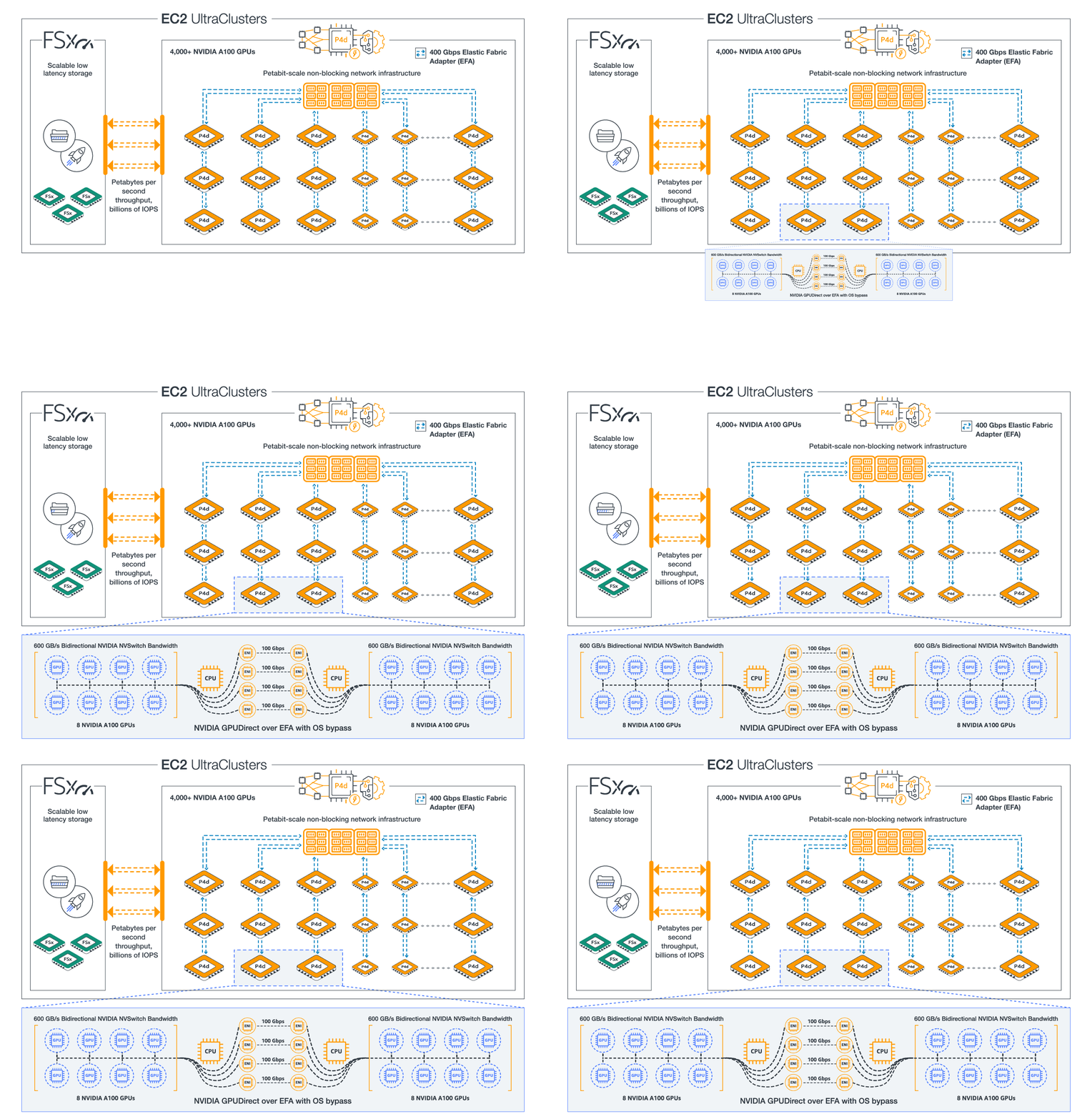
Diagram of P4d UltraClusters

P4d consists of 8 A100 GPUs, with 40GB GPU Memory each

P4de consists of 8 A100 80GB GPUs, with 80GB GPU memory each

Nvidia blog on HGX baseboard supporting 8 A100 GPUs – https://developer.nvidia.com/blog/introducing-hgx-a100-most-powerful-accelerated-server-platform-for-ai-hpc/

A100 80GB data sheet – https://www.nvidia.com/en-us/data-center/a100/

MIG support in A100 – https://developer.nvidia.com/blog/getting-the-most-out-of-the-a100-gpu-with-multi-instance-gpu/ and MIG user guide – https://docs.nvidia.com/datacenter/tesla/mig-user-guide

MIG support in AWS EC2 instance type P4d and in AWS EKS – https://developer.nvidia.com/blog/amazon-elastic-kubernetes-services-now-offers-native-support-for-nvidia-a100-multi-instance-gpus/

GCP A2 adds 16 A100 GPUs to a node – https://cloud.google.com/blog/products/compute/announcing-google-cloud-a2-vm-family-based-on-nvidia-a100-gpu

https://cloud.google.com/blog/products/containers-kubernetes/gke-now-supports-multi-instance-gpus

Running more pods/gpu on EKS with MIG – https://medium.com/itnext/run-more-pods-per-gpu-with-nvidia-multi-instance-gpu-d4f7fb07c9b5

Nvidia Embraces The CPU World With “Grace” Arm Server Chip

EC2 Trainium UltraClusters

Each EC2 Trn1 instance has

  • up to 16 AWS Trainium accelerators purpose built to accelerate DL training and deliver up to 3.4 petaflops of FP16/BF16 compute power. Each accelerator includes two second-generation NeuronCores
  • 512 GB of shared accelerator memory (HBM) with 9.8 TB/s of total memory bandwidth
  • 1600 Gbps of Elastic Fabric Adapter (EFAv2)

An EC2 Trn1 UltraCluster, consists of densely packed, co-located racks of Trn1 compute instances interconnected by non-blocking petabyte scale networking. It is our largest UltraCluster to date, offering 6 exaflops of compute power on demand with up to 30,000 Trainium chips.

https://aws.amazon.com/blogs/machine-learning/scaling-large-language-model-llm-training-with-amazon-ec2-trn1-ultraclusters/