Category: ml

Sizing an LLM for GPU memory

When choosing the EC2 instance for a Large Language Model, one of the first constraints is whether the model will fit in the GPU memory of an instance.

Given a choice of a model, the decisions roughly follow this path –

Model -> Training/Inferencing -> Technique (choice of optimization) -> Memory requirement -> Instance requirement -> Instance availability -> smaller instance or more optimization or distributed training.

Some extreme optimizations are possible such as QLora for Inferencing . See the blog How to fit a layer in memory at a time https://huggingface.co/blog/lyogavin/airllm . However many use cases do not want any sacrifices in accuracy.

Distributed training by splitting the model against smaller instances is another possibility. A discussion is here – https://siboehm.com/articles/22/pipeline-parallel-training

Here’s a listing of different GPU instance types with a column for GPU Memory (GiB) on one page to facilitate instance comparisons.

EC2 G3 Instance Details
NameGPUsvCPUMemory (GiB)GPU Memory (GiB)Price/hr* (Linux)Price/hr* (Windows)1-yr Reserved Instance Effective Hourly* (Linux)3-yr Reserved Instance Effective Hourly* (Linux)
g3s.xlarge1430.58$0.75
$0.93
$0.525$0.405
g3.4xlarge1161228$1.14$1.876$0.741$0.538
g3.8xlarge23224416$2.28$3.752$1.482$1.076
g3.16xlarge46448832$4.56$7.504$2.964$2.152
EC2 G4 Instance details
 Instance SizeGPUvCPUsMemory (GiB)Instance Storage (GB)Network Bandwidth (Gbps)EBS Bandwidth (Gbps)On-Demand Price/hr*1-yr Reserved Instance Effective Hourly* (Linux)3-yr Reserved Instance Effective Hourly* (Linux)

G4dn

Single GPU VMsg4dn.xlarge14161 x 125 NVMe SSDUp to 25Up to 3.5$0.526$0.316$0.210
g4dn.2xlarge18321 x 225 NVMe SSDUp to 25Up to 3.5$0.752$0.452$0.300
g4dn.4xlarge116641 x 225 NVMe SSDUp to 254.75$1.204$0.722$0.482
g4dn.8xlarge1321281 x 900 NVMe SSD509.5$2.176$1.306$0.870
g4dn.16xlarge1642561 x 900 NVMe SSD509.5$4.352$2.612$1.740
           
Multi GPU VMsg4dn.12xlarge4481921 x 900 NVMe SSD509.5$3.912$2.348$1.564
g4dn.metal8963842 x 900 NVMe SSD10019$7.824$4.694$3.130

G4ad

Single GPU VMsg4ad.xlarge14161 x 150 NVMe SSDUp to 10Up to 3$0.379$0.227$0.178
g4ad.2xlarge18321 x 300 NVMe SSDUp to 10Up to 3$0.541$0.325$0.254
g4ad.4xlarge116641 x 600 NVMe SSDUp to 10Up to 3$0.867$0.520$0.405
           
Multi GPU VMsg4ad.8xlarge2321281 x 1200 NVMe SSD153$1.734$1.040$0.810
g4ad.16xlarge4642561 x 2400 NVMe SSD256$3.468$2.081$1.619
EC2 G5 instance details
 Instance SizeGPUGPU Memory (GiB)vCPUsMemory (GiB)Storage (GB)Network Bandwidth (Gbps)EBS Bandwidth (Gbps)On Demand Price/hr*1-yr ISP Effective Hourly (Linux)3-yr ISP Effective Hourly (Linux)
Single GPU VMsg5.xlarge1244161×250Up to 10Up to 3.5$1.006$0.604$0.402
g5.2xlarge1248321×450Up to 10Up to 3.5$1.212$0.727$0.485
g5.4xlarge12416641×600Up to 258$1.624$0.974$0.650
g5.8xlarge124321281×9002516$2.448$1.469$0.979
g5.16xlarge124642561×19002516$4.096$2.458$1.638
            
Multi GPU VMsg5.12xlarge496481921×38004016$5.672$3.403$2.269
g5.24xlarge496963841×38005019$8.144$4.886$3.258
g5.48xlarge81921927682×380010019$16.288$9.773$6.515
EC2 G6 instance details
 Instance SizeGPUGPU Memory (GB)vCPUsMemory (GiB)Storage (GB)Network Bandwidth (Gbps)EBS Bandwidth (Gbps)On Demand Price/hr*1-yr ISP Effective Hourly (Linux)3-yr ISP Effective Hourly (Linux)
Single GPU VMs          g6.xlarge1244161×250Up to 10Up to 5$0.805$0.499$0.342
g6.2xlarge1248321×450Up to 10Up to 5$0.978$0.606$0.416
g6.4xlarge12416641×600Up to 258$1.323$0.820$0.562
g6.8xlarge124321282×4502516$2.014$1.249$0.856
g6.16xlarge124642562×9402520$3.397$2.106$1.443
Gr6 instances with 1:8 vCPU:RAM ratio
gr6.4xlarge124161281×600Up to 258$1.539$0.954$0.654
gr6.8xlarge124322562×4502516$2.446$1.517$1.040
            
Multi GPU VMsg6.12xlarge496481924×9404020$4.602$2.853$1.955
g6.24xlarge496963844×9405030$6.675$4.139$2.837
g6.48xlarge81921927688×94010060$13.35$8.277$5.674
EC2 G6e instances
Instance SizeGPUGPU Memory (GiB)  vCPUsMemory(GiB)Storage (GB)  Network Bandwidth (Gbps)  EBS Bandwidth (Gbps)
g6e.xlarge148432250Up to 20Up to 5
g6e.2xlarge148864450Up to 20Up to 5
g6e.4xlarge14816128600208
g6e.8xlarge148322569002516
g6e.16xlarge1486451219003520
g6e.12xlarge419248384380010020
g6e.24xlarge419296768380020030
g6e.48xlarge83841921536760040060
EC2 P3 instance details
Instance SizeGPUs – Tesla V100GPU Peer to PeerGPU Memory (GB)vCPUsMemory (GB)Network BandwidthEBS BandwidthOn-Demand Price/hr*1-yr Reserved Instance Effective Hourly*3-yr Reserved Instance Effective Hourly*
p3.2xlarge1N/A16861Up to 10 Gbps1.5 Gbps$3.06$1.99$1.05
p3.8xlarge4
NVLink643224410 Gbps7 Gbps$12.24$7.96$4.19
p3.16xlarge8NVLink1286448825 Gbps14 Gbps$24.48$15.91$8.39
p3dn.24xlarge8NVLink25696768100 Gbps19 Gbps$31.218$18.30$9.64
EC2 P4 instance details
Instance SizevCPUsInstance Memory (GiB)GPU – A100GPU memoryNetwork Bandwidth (Gbps)GPUDirect RDMAGPU Peer to PeerInstance Storage (GB)EBS Bandwidth (Gbps)On-demand Price/hr1-yr Reserved Instance Effective Hourly *3-yr Reserved Instance Effective Hourly *
p4d.24xlarge9611528320 GB
HBM2
400 ENA and EFAYes600 GB/s NVSwitch8 x 1000 NVMe SSD19$32.77$19.22$11.57
p4de.24xlarge (preview)9611528640 GB
HBM2e
400 ENA and EFAYes600 GB/s NVSwitch8 x 1000 NVMe SSD19$40.96$24.01$14.46
EC2 P5 instance details
Instance SizevCPUInstance Memory (TiB)GPU – H100GPU  MemoryNetwork BandwidthGPUDirectRDMAGPU Peer to PeerInstance Storage (TB)EBS Bandwidth (Gbps)
p5.48xlarge1928640 GB HBM33200 Gbps EFAv2Yes900 GB/s NVSwitch8 x 3.84 NVMe SSD80 
EC2 P5e instance details
Instance SizevCPUsInstance Memory (TiB)GPUGPU memoryNetwork Bandwidth (Gbps)GPUDirect RDMAGPU Peer to PeerInstance Storage (TB)EBS Bandwidth (Gbps)
p5e.48xlarge19228 x NVIDIA H2001128 GB
HBM3e
3200 Gbps EFAYes900 GB/s NVSwitch8 x 3.84 NVMe SSD80

Relevant links

P5e and P5en announcement (update Sep’24). https://aws.amazon.com/blogs/machine-learning/amazon-ec2-p5e-instances-are-generally-available/

https://en.wikipedia.org/wiki/List_of_Nvidia_graphics_processing_units

Use of Triton and NIM to make use of GPU memory across multiple GPUs on an instance –

https://github.com/aws-samples/amazon-eks-machine-learning-with-terraform-and-kubeflow

https://aws.amazon.com/blogs/hpc/deploying-generative-ai-applications-with-nvidia-nims-on-amazon-eks

FP4 and four bit integer quantization, and QLoRA

Making LLMs even more accessible with bitsandbytes, 4-bit quantization and QLoRA at https://huggingface.co/blog/4bit-transformers-bitsandbytes

[2305.14152] Memory-Efficient Fine-Tuning of Compressed Large Language Models via sub-4-bit Integer Quantization

Note: Performance is not just about GPU memory but also network bandwidth which is needed to load the large models especially for a platform serving multiple models.

When comparing the importance of high memory bandwidth between training and inference for Large Language Models (LLMs), it is generally more critical for training. Here’s why:

1. Training LLMs

  • Data Movement: Training LLMs involves frequent data movement between the GPU memory and the processing units. Each training iteration requires loading large batches of data, performing extensive matrix multiplications, and updating weights, all of which are memory-intensive operations.
  • Backward Pass: During the training phase, the backward pass (gradient computation and backpropagation) is highly memory bandwidth-intensive. The gradients of each layer are computed and propagated back through the network, requiring significant memory access.
  • Parameter Updates: High memory bandwidth is essential to handle the large volume of data being read and written during the parameter updates across multiple layers, especially in very deep models.
  • Larger Models and Datasets: Training large models like GPT-3 or GPT-4 involves massive datasets and millions (or even billions) of parameters, leading to a substantial demand for memory bandwidth.

2. Inferencing of LLMs:

  • Data Movement: During inference, the primary task is to process input data and generate outputs, which involves reading the model parameters and performing computations. While this still requires good memory bandwidth, the demands are generally lower compared to training.
  • No Backpropagation: Inference does not involve the backward pass or parameter updates, significantly reducing the need for continuous memory writes. The absence of gradient computations and updates reduces the overall memory bandwidth requirements.
  • Smaller Batch Sizes: Inference typically operates on smaller batch sizes compared to training, further reducing the demand for memory bandwidth.
  • Optimizations: Techniques such as model quantization and optimized inference runtimes (like TensorRT) can reduce the memory bandwidth required during inference by optimizing how data is accessed and processed.

SageMaker Hyperpod for Distributed Model Training

Amazon SageMaker HyperPod is a new infrastructure designed specifically for distributed training at scale. It offers a purpose-built, high-performance environment that accelerates the training of large machine learning models by optimizing resource allocation, reducing communication overhead, and providing seamless scaling. HyperPod integrates with SageMaker to simplify complex training workflows, making it easier for users to efficiently train foundation models and other large-scale ML workloads. This innovation supports faster iteration and development of AI models. https://aws.amazon.com/sagemaker/hyperpod , https://aws.amazon.com/blogs/machine-learning/introducing-amazon-sagemaker-hyperpod-to-train-foundation-models-at-scale

Perplexity, a generative AI startup, improved its model training speed by 40% using Amazon SageMaker HyperPod on AWS. By leveraging advanced distributed training capabilities and EC2 instances, Perplexity optimized its model training and inference processes. This allowed the company to efficiently handle over 100,000 queries per hour with low latency and high throughput, enhancing user experiences and enabling rapid iteration in AI development. https://aws.amazon.com/solutions/case-studies/perplexity-case-study

https://docs.aws.amazon.com/sagemaker/latest/dg/sagemaker-hyperpod-cluster-observability.html

LLM optimization – PEFT, LORA, QLORA

Large Language Models (LLMs) have transformed natural language processing, but their immense size and computational demands pose significant challenges. Optimizing these models is crucial for efficient deployment, particularly in resource-constrained environments. Below, we explore several optimization techniques, including Parameter-Efficient Fine-Tuning (PEFT), Low-Rank Adaptation (LoRA), and Quantized Low-Rank Adaptation (QLoRA), highlighting their unique benefits and differences.

1. Parameter-Efficient Fine-Tuning (PEFT)

PEFT is designed to reduce the computational burden of fine-tuning large models by updating only a small subset of the model’s parameters, rather than the entire model. This approach allows for significant resource savings while maintaining performance, making it particularly useful for adapting LLMs to new tasks with limited data or compute resources.

Key Features:

  • Selective Parameter Update: Only a fraction of the model’s parameters are fine-tuned.
  • Efficiency: Reduces the computational cost and memory footprint during fine-tuning.
  • Flexibility: Can be applied across various LLM architectures.
2. Low-Rank Adaptation (LoRA)

LoRA is a technique that further reduces the number of parameters to be updated during fine-tuning by decomposing the model’s weight matrices into low-rank components. By introducing low-rank matrices that are trained alongside the existing weights, LoRA enables fine-tuning with minimal additional parameters, preserving the original model’s architecture.

Key Features:

  • Low-Rank Decomposition: Decomposes weights into low-rank matrices to minimize parameter updates.
  • Minimal Overhead: Adds only a small number of trainable parameters.
  • Performance: Maintains or even enhances model performance on specific tasks.
3. Quantized Low-Rank Adaptation (QLoRA)

QLoRA combines quantization and LoRA to maximize memory and computational efficiency. By quantizing the low-rank matrices, QLoRA reduces the precision of these components, allowing for even greater reductions in memory usage and computational costs without a significant loss in accuracy.

Key Features:

  • Quantization: Reduces precision of low-rank matrices to lower memory usage.
  • Memory Efficiency: Significantly decreases the memory required for fine-tuning.
  • Scalability: Ideal for large-scale deployments where memory is a critical concern.
Contrasting PEFT, LoRA, and QLoRA
  • Parameter Update Strategy:
    • PEFT: Updates a small subset of existing parameters.
    • LoRA: Introduces additional low-rank matrices for parameter updates.
    • QLoRA: Combines low-rank matrices with quantization for extreme memory efficiency.
  • Memory and Computational Requirements:
    • PEFT: Reduces overall fine-tuning costs but may still require substantial memory.
    • LoRA: Further reduces memory usage by minimizing the number of updated parameters.
    • QLoRA: Offers the most memory efficiency by applying quantization to the low-rank matrices.
  • Application Scenarios:
    • PEFT: Suitable for fine-tuning in environments with limited compute resources.
    • LoRA: Ideal for scenarios requiring efficient fine-tuning with minimal parameter overhead.
    • QLoRA: Best for large-scale deployments where memory efficiency is paramount.

AlphaFold for protein structure prediction with deep learning – how does it work

AlphaFold is a deep learning model developed by DeepMind that predicts protein structure. It uses a two-step process: First, it generates a representation of the protein’s amino acid sequence. Then, it refines this representation to predict the 3D structure of the protein. The model is trained on a large database of known protein structures and uses a neural network architecture called a convolutional neural network (CNN) to make these predictions. It leverages the concept of attention mechanisms to incorporate information from multiple parts of the protein sequence during the prediction process. It combines advanced machine learning techniques with protein structure data to make accurate predictions about protein folding.

Attention mechanisms are a key component of AlphaFold and play a crucial role in capturing dependencies between different parts of a protein sequence. To understand attention mechanisms, let’s break it down step by step.

  1. Embedding the Protein Sequence:
    AlphaFold starts by embedding the amino acid sequence of a protein into a numerical representation. Each amino acid is represented as a vector, and these vectors are combined to form the input sequence matrix, X ∈ ℝ^(L×D), where L is the length of the sequence and D is the dimensionality of each amino acid vector.
  2. Creating Query, Key, and Value Matrices:
    AlphaFold then generates three matrices – Query (Q), Key (K), and Value (V) – by linearly transforming the input sequence matrix X. This transformation is performed using learnable weight matrices WQ, WK, and WV. The resulting matrices are Q = XWQ, K = XWK, and V = XWV, each having dimensions of L×D.
  3. Calculating Attention Weights:
    The attention mechanism computes the similarity between each query vector and key vector by taking their dot products. This similarity is scaled by a factor of √(D), and a softmax function is applied to obtain attention weights. The attention weights determine how much each key contributes to the final output. Let’s denote the attention weights matrix as A ∈ ℝ^(L×L), where each element A_ij represents the attention weight between the i-th query and j-th key. The attention weights are calculated as follows: A_ij = softmax((Q_i ⋅ K_j) / √(D)) Here, Q_i represents the i-th row of the Query matrix, and K_j represents the j-th row of the Key matrix.
  4. Weighted Sum of Values:
    The final step is to compute the weighted sum of the Value matrix using the attention weights. This is done by taking the matrix multiplication of attention weights A and the Value matrix V. The resulting matrix C, representing the context or attended representation, is given by: C = AV The context matrix C has dimensions of L×D, where each row represents a weighted sum of the Value vectors based on the attention weights.

Attention mechanisms in AlphaFold allow the model to capture the relationships and dependencies between different parts of the protein sequence. By assigning attention weights to relevant amino acids, the model can focus on important regions during the prediction process, enabling accurate protein structure predictions.

The dimensions of the matrices involved are as follows:

  • Input Sequence Matrix (X): X ∈ ℝ^(L×D), where L is the length of the protein sequence and D is the dimensionality of each amino acid vector.
  • Query Matrix (Q): Q ∈ ℝ^(L×D), same as the dimensions of X.
  • Key Matrix (K): K ∈ ℝ^(L×D), same as the dimensions of X.
  • Value Matrix (V): V ∈ ℝ^(L×D), same as the dimensions of X.
  • Attention Weights Matrix (A): A ∈ ℝ^(L×L), where each element A_ij represents the attention weight between the i-th query and j-th key.
  • Context Matrix (C): C ∈ ℝ^(L×D), same as the dimensions of X.

So the matrices Q, K, V, X, and C have dimensions L×D, where L represents the length of the protein sequence and D represents the dimensionality of the amino acid vectors. The attention weights matrix A has dimensions L×L, capturing the attention weights between each query and key pair.

OpenFold is a pytorch based reproduction of alphafold , a comparison is used in https://wandb.ai/telidavies/ml-news/reports/OpenFold-A-PyTorch-Reproduction-Of-DeepMind-s-AlphaFold–VmlldzoyMjE3MjI5

What are amino acids ? Amino acids are organic compounds that serve as the building blocks of proteins. They contain an amino group (-NH2) and a carboxyl group (-COOH) attached to a central carbon atom, along with a specific side chain (R-group). The side chain varies among different amino acids, giving them unique properties.

There are 20 standard amino acids that are commonly found in proteins. Each amino acid has a unique structure and properties, determined by its specific side chain. Some examples include glycine, alanine, valine, leucine, isoleucine, serine, threonine, cysteine, methionine, aspartic acid, glutamic acid, lysine, arginine, histidine, phenylalanine, tyrosine, tryptophan, asparagine, glutamine, and proline.

Amino acids encode proteins through a process called translation. The genetic information stored in DNA is transcribed into messenger RNA (mRNA). The mRNA is then read by ribosomes, which assemble amino acids in a specific sequence according to the instructions provided by the mRNA. This sequence of amino acids forms a polypeptide chain, which then folds into a functional protein with a specific structure and function. The sequence of amino acids in a protein is determined by the sequence of nucleotides in the corresponding mRNA molecule.

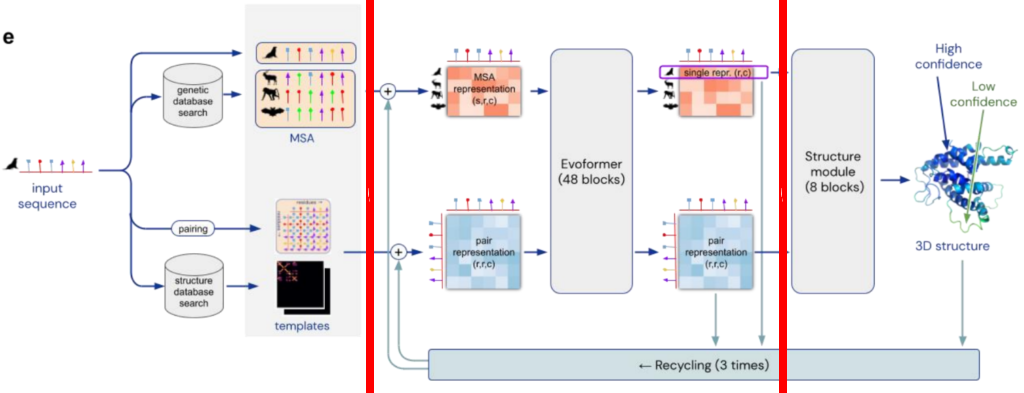
Structure of AlphaFold from Nature paper, and as described here.

https://www.forbes.com/sites/robtoews/2023/07/16/the-next-frontier-for-large-language-models-is-biology/

https://www.nature.com/articles/s41592-023-01924-w A team of researchers led by Peter Kim at Stanford University has performed guided protein evolution using protein language models that were trained on millions of natural protein sequences.

https://aibusiness.com/nlp/meta-lays-off-team-behind-its-protein-folding-model

https://techcrunch.com/2024/06/25/evolutionaryscale-backed-by-amazon-and-nvidia-raises-142m-for-protein-generating-ai/

https://github.com/evolutionaryscale/esm

https://github.com/aws-samples/drug-discovery-workflows

https://github.com/lucidrains/alphafold3-pytorch

https://github.com/google-deepmind/alphafold

https://fold.it/about_foldit

https://build.nvidia.com/explore/biology

LLM evolution – Anthropic , AI21, Cohere, GPT-4

https://github.com/Mooler0410/LLMsPracticalGuide

Source paper – Harnessing the Power of LLMs in Practice: A Survey on ChatGPT and Beyond

Pink branch is encoder only. Green branch is encoder-decoder. Blue branch is decoder-only.

This is consistent with the Generative aspect of the blue branch. But it does not explain the emergent properties at the top of the blue tree.

LLM leaderboard – https://chat.lmsys.org/?leaderboard

Stanford HELM (holistic evaluation of LMs) – https://crfm.stanford.edu/helm/latest/?models=1

Constitutional AI paper from Anthropic – https://arxiv.org/abs/2212.08073

More on emergent properties in links below.

https://yaofu.notion.site/How-does-GPT-Obtain-its-Ability-Tracing-Emergent-Abilities-of-Language-Models-to-their-Sources-b9a57ac0fcf74f30a1ab9e3e36fa1dc1

https://openai.com/research/solving-math-word-problems : Autoregressive models, which generate each solution token by token, have no mechanism to correct their own errors. Solutions that veer off-course quickly become unrecoverable, as can be seen in the examples provided. We address this problem by training verifiers to evaluate the correctness of model-generated solutions. Verifiers are given many possible solutions, all written by the model itself, and they are trained to decide which ones, if any, are correct.

Language Models are Few-Shot Learners – https://openai.com/research/language-models-are-few-shot-learners

LLM inferencing tools/techniques were discussed here.

LLM Inferencing is hard – tools and techniques

Large Language Models take up a lot of GPU memory with the larger ones exceeding GPU memory sizes. Space is taken up my the model weights as well as by in-memory query specific tensor calculations. Model parallelism to store an LLM across multiple GPUs is both expensive and hard. This makes it important to look at techniques to fit an LLM in a single GPU.

Let’s say the foundation models are available such that no further training is needed and and that one (just) wants to inference against them. Inferencing is not a small challenge, and a number of techniques have been explored. Here’s a link – https://lilianweng.github.io/posts/2023-01-10-inference-optimization/ which discusses

  • student-teacher knowledge distillation training, leading to DistilBert
  • quantization, quantization-aware training, post-training quantization
  • pruning
  • architectural optimization, efficient transformers

OpenAI link on speeding and scaling LLMs to 100k context windows – https://blog.gopenai.com/how-to-speed-up-llms-and-use-100k-context-window-all-tricks-in-one-place-ffd40577b4c

High-throughput Generative Inference of Large Language Models with a Single GPU https://arxiv.org/pdf/2303.06865.pdf, discusses 3 strategies with a focus on a single GPU.

  • model compression
  • collaborative inference
  • offloading to utilize memory from CPU and disk

They then show 3 contributions

  • definition of the optimization search space for offloading, including weights, activations, KV cache, and an algorithm to get an optimal offloading strategy within the search space
  • quantization of the parameters to 4 bits with small loss of accuracy
  • run a OPT-175B model on a single T4 GPU with 16GB memory (!)

PEFT – Scaling Down to Scale Up: A Guide to Parameter-Efficient Fine-Tuning – https://arxiv.org/pdf/2303.15647.pdf says ”expanding the context size leads to a quadratic increase in inference costs

There are three main classes of PEFT methods:

  • Addition-based, ( Within additive methods, we distinguish two large included groups: Adapter-like methods and Soft prompts)
  • Selection-based, and
  • Reparametrization-based.

General strategies for inference concurrency, courtesy chatgpt:

To process multiple concurrent inference requests without interference between them, a model can use techniques such as parallelization and batching.

Parallelization involves splitting the workload across multiple processing units, such as CPUs or GPUs, so that multiple requests can be processed simultaneously without interfering with each other. This can be achieved using frameworks such as TensorFlow or PyTorch, which provide support for parallel processing.

Batching involves grouping multiple requests together and processing them as a single batch. This can increase the efficiency of the model by reducing the overhead associated with processing each request individually. Batching can be particularly effective for models that are optimized for throughput rather than latency.

Another technique that can be used is dynamic scheduling, which involves assigning resources to requests based on their priority and the availability of resources at a given time. This can help ensure that high-priority requests are processed quickly without interfering with lower-priority requests.

Efficiently scaling transformer inference – link is a paper from Google discussing partitioning of weights and activations across multiple heads and multiple chips (Nov’22).

Feature Vectors, Embeddings, Vector Databases, Feature Stores

An ML model consists of a set of weights (or a set of numerical values) that transform inputs to outputs (along with a nonlinear transform such as a sigmoid function). The weights are often organized as vectors or matrices. Consider neural networks, decision trees and support vector machines as types of ML models for this discussion.

The weights representing features of the data (input or intermediate data) are also called feature vectors or vectors. They are also called embeddings, that is embeddings of vectors in a vector space. We discussed such vectors in https://securemachinery.com/2019/05/24/transformer-gpt-2/.

The term “embedding” comes from the idea that the vectors “embed” the original data into a lower-dimensional space. The embedding process involves a combination of statistical and computational techniques, such as factorization and neural networks, that learn to map the input data into the vector space in a way that preserves the relevant properties of the original data.

The use of vectors to represent words in machine learning research started in 2013 with the publication of the paper “Distributed Representations of Words and Phrases and their Compositionality” by Tomas Mikolov et al. This paper introduced the word2vec algorithm, which generates dense vector representations of words based on their distributional properties in a large corpus of text. The size of the vector or embedding in a word embedding model is a hyperparameter that needs to be determined before training the model. It is typically chosen based on the size of the vocabulary and the complexity of the task at hand. In practice, the vector size is often set to be between 100 and 300 dimensions, but this can vary depending on the specific application and the available computational resources. The optimal vector size can be determined through experimentation and tuning of hyperparameters.

One difference between embeddings and feature vectors is that embeddings are typically learned automatically from the data, while feature vectors are typically chosen based on domain knowledge or feature engineering. However these two terms are often used interchangeably. Here is a video going over how the embeddings are obtained from words in a sentence with a bag of words approach- https://www.youtube.com/watch?v=viZrOnJclY0 .

Pinecone, Milvus, Facebook AI Similarity Search (FAISS), Google Vertex Matching engine are examples of Vector databases.

The challenge in implementing a vector database is that traditional databases are not optimized for handling high-dimensional vector data, which is often used in machine learning and data science applications.

Vector data is typically represented as arrays of numbers, where each number represents a feature or attribute of the data. For example, an image might be represented as a high-dimensional vector where each dimension represents the color value of a specific pixel. In contrast to traditional databases, where each record consists of a set of fields or columns, vector databases need to store and index large volumes of high-dimensional data in a way that supports efficient similarity search.

In traditional databases, queries are typically based on simple comparisons of scalar values, such as equality or range queries. However, in vector databases, similarity search is the primary operation, which requires specialized algorithms and data structures to efficiently compute the similarity between vectors. These algorithms are designed to handle high-dimensional data and minimize the amount of computation needed to compare vectors, which can be computationally expensive.

There are several specialized algorithms that are commonly used in vector databases to support efficient similarity search. Here are some examples:

  1. Euclidean Distance: This is a distance metric that measures the straight-line distance between two points in Euclidean space. It is commonly used in vector databases to compute the distance or similarity between vectors.
  2. Cosine Similarity: This is a similarity metric that measures the cosine of the angle between two vectors. It is commonly used in text-based applications to measure the similarity between documents or word embeddings.
  3. Locality-Sensitive Hashing (LSH): This is a technique used to hash high-dimensional vectors into lower-dimensional buckets based on their similarity. It is commonly used in vector databases to speed up similarity search by reducing the number of comparisons needed to find similar vectors.
  4. Product Quantization: This is a technique used to divide high-dimensional vectors into smaller subvectors and quantize them separately. It is commonly used in vector databases to reduce the dimensionality of the data and speed up similarity search.
  5. Inverted Indexing: This is a technique used to index the vectors based on the values of their individual dimensions. It is commonly used in text-based applications to speed up search queries by indexing the terms in the document.

Pinecone provides several indexing and search algorithms, including approximate nearest neighbor search, that are selected automatically based on the properties of the data and the search requirements. However, you can also specify a specific algorithm or tuning parameters when creating an index or performing a query by passing in the appropriate arguments. For example, you can use the method parameter when creating an index to specify the indexing method, or the distance parameter when performing a query to specify the distance metric to use.

While OpenSearch is not specifically designed as a vector database like Pinecone, it provides vector search capabilities through its support for nearest neighbor search. OpenSearch uses the K-Nearest Neighbor (K-NN) algorithm to perform nearest neighbor search for vector data. K-NN is a machine learning algorithm that can be used to find the K nearest neighbors of a query vector in a high-dimensional space. OpenSearch also provides support for approximate nearest neighbor search using algorithms such as Annoy and Hnswlib. To use vector search in OpenSearch, you first need to index your vector data using the appropriate data type (e.g., float or double). You can then perform a nearest neighbor search by specifying the query vector and the number of nearest neighbors to return. OpenSearch also provides support for vector scoring, which allows you to rank search results based on their similarity to a query vector. You can use vector scoring to boost or filter search results based on their similarity to a query vector.

What kind of vectorization schemes are useful for log processing ?

When processing log data, the goal is typically to extract useful information from the log entries and transform them into a format that can be easily analyzed and searched. Vectorization is a common technique used for this purpose, and there are several vectorization schemes that are applicable to log processing. Here are some examples:

  1. Bag-of-words: This is a vectorization scheme that represents a document as a bag of words, where each word is represented by a dimension in the vector and the value of the dimension is the frequency of the word in the document. Bag-of-words can be used to represent log entries as a vector of words, which can be used for tasks such as text classification and anomaly detection.
  2. TF-IDF: This is a vectorization scheme that represents a document as a weighted combination of its term frequency and inverse document frequency. TF-IDF can be used to represent log entries as a vector of weighted words, which can be used for tasks such as information retrieval and text mining.
  3. Word embeddings: This is a vectorization scheme that represents words as dense vectors in a high-dimensional space, where the distance between vectors reflects the semantic similarity between the words. Word embeddings can be used to represent log entries as a vector of word embeddings, which can be used for tasks such as text classification and entity recognition.
  4. Sequence embeddings: This is a vectorization scheme that represents a sequence of words as a dense vector in a high-dimensional space, where the distance between vectors reflects the similarity between the sequences. Sequence embeddings can be used to represent log entries as a vector of sequence embeddings, which can be used for tasks such as sequence classification and anomaly detection.
  5. One-hot encoding: This is a vectorization scheme that represents categorical data as binary vectors, where each dimension corresponds to a possible category and the value of the dimension is 1 if the data belongs to that category and 0 otherwise. One-hot encoding can be used to represent log entries as a vector of categorical features, which can be used for tasks such as classification and clustering.

By using a suitable vectorization scheme, log data can be transformed into a format that can be easily analyzed and searched, enabling tasks such as anomaly detection, root cause analysis, and performance optimization.

Vector database versus Feature store – what’s the difference ?

Both vector databases and feature stores are used to manage and serve high-dimensional data, such as embeddings, vectors, and other numerical representations, but there are some key differences between the two.

A vector database is a database optimized for storing and querying high-dimensional vector data. It provides efficient indexing and search algorithms, such as approximate nearest neighbor search, that allow for fast and scalable similarity search. Vector databases are commonly used in machine learning applications, such as recommendation systems and natural language processing, where the goal is to find similar items or entities based on their vector representations.

A feature store, on the other hand, is a centralized repository for machine learning features that provides a way to store, manage, and share feature data across different applications and teams. It is designed to help data scientists and machine learning engineers build, test, and deploy machine learning models more efficiently by providing a unified interface for accessing and managing features.

While both vector databases and feature stores can store and serve high-dimensional data, the main difference is their focus and use case. Vector databases are designed for efficient similarity search, while feature stores are designed for feature management and sharing across different applications and teams. In practice, they can complement each other in many machine learning workflows, with the vector database providing the efficient similarity search capabilities and the feature store providing a centralized and standardized way to manage and share feature data.

Comparison of Milvus Pinecone Vespa Weaviate Vald GSI Qdrant – https://towardsdatascience.com/milvus-pinecone-vespa-weaviate-vald-gsi-what-unites-these-buzz-words-and-what-makes-each-9c65a3bd0696

Anyscale – Using an embeddings database to train an LLM using Ray – https://www.anyscale.com/blog/llm-open-source-search-engine-langchain-ray

OpenAI embeddings example – https://github.com/openai/openai-cookbook/blob/main/examples/Question_answering_using_embeddings.ipynb

HuggingFace sentence embeddings article – https://medium.com/huggingface/universal-word-sentence-embeddings-ce48ddc8fc3a

AWS – https://medium.com/@shankar.arunp/augmenting-large-language-models-with-verified-information-sources-leveraging-aws-sagemaker-and-f6be17fb10a8

Langchain example

langchain enables agentic code to invoke one or more agents

from langchain.agents import load_tools
from langchain.agents import initialize_agent
from langchain.llms import OpenAI
llm = OpenAI(temperature=0)
tools = load_tools(["serpapi", "llm-math"], llm=llm)
agent = initialize_agent(tools, llm, agent="zero-shot-react-description", verbose=True)
agent.run("how can one fine-tune a generative ai llm model ?")

here’s the output, showing it “thinking” through the steps to answer the question posed.

$ python langchain-test.py


> Entering new AgentExecutor chain...
 I need to understand the process of fine-tuning a generative ai llm model
Action: Search
Action Input: "fine-tuning generative ai llm model"
Observation: A beginner-friendly introduction to fine-tuning Large language models using the LangChain framework on your domain data.
Thought: I need to understand the specific steps of fine-tuning a generative ai llm model
Action: Search
Action Input: "steps to fine-tune generative ai llm model"
Observation: This step involves training the pre-trained LLM on the task-specific dataset. The training process involves optimizing the model's weights and ...
Thought: I now know the final answer
Final Answer: The process of fine-tuning a generative ai llm model involves training the pre-trained LLM on the task-specific dataset and optimizing the model's weights and
 parameters.

> Finished chain.

This required Python 3.10.10

Langchain interface to Vector Stores – https://python.langchain.com/en/latest/modules/indexes/vectorstores.html

Langchain gallery – https://github.com/kyrolabs/awesome-langchain

https://blog.langchain.dev/going-beyond-chatbots-how-to-make-gpt-4-output-structured-data-using-langchain/

EC2 P5 UltraClusters

Each P5 EC2 instances has

  • eight NVIDIA H100 GPUs capable of 16 petaFLOPs of mixed-precision performance
  • 640 GB of high-bandwidth memory, 80GB in each GPU
  • 3,200 Gbps networking connectivity (8x more than the previous generation)

The increased performance of P5 instances accelerates the time-to-train machine learning (ML) models by up to 6x (reducing training time from days to hours), and the additional GPU memory helps customers train larger, more complex models.

P5 instances are expected to lower the cost to train ML models by up to 40% over the previous generation, providing customers greater efficiency over less flexible cloud offerings or expensive on-premises systems.

https://nvidianews.nvidia.com/news/aws-and-nvidia-collaborate-on-next-generation-infrastructure-for-training-large-machine-learning-models-and-building-generative-ai-applications

Nvidia H100 GPU overview and data sheet – https://resources.nvidia.com/en-us-tensor-core/gtc22-whitepaper-hopper

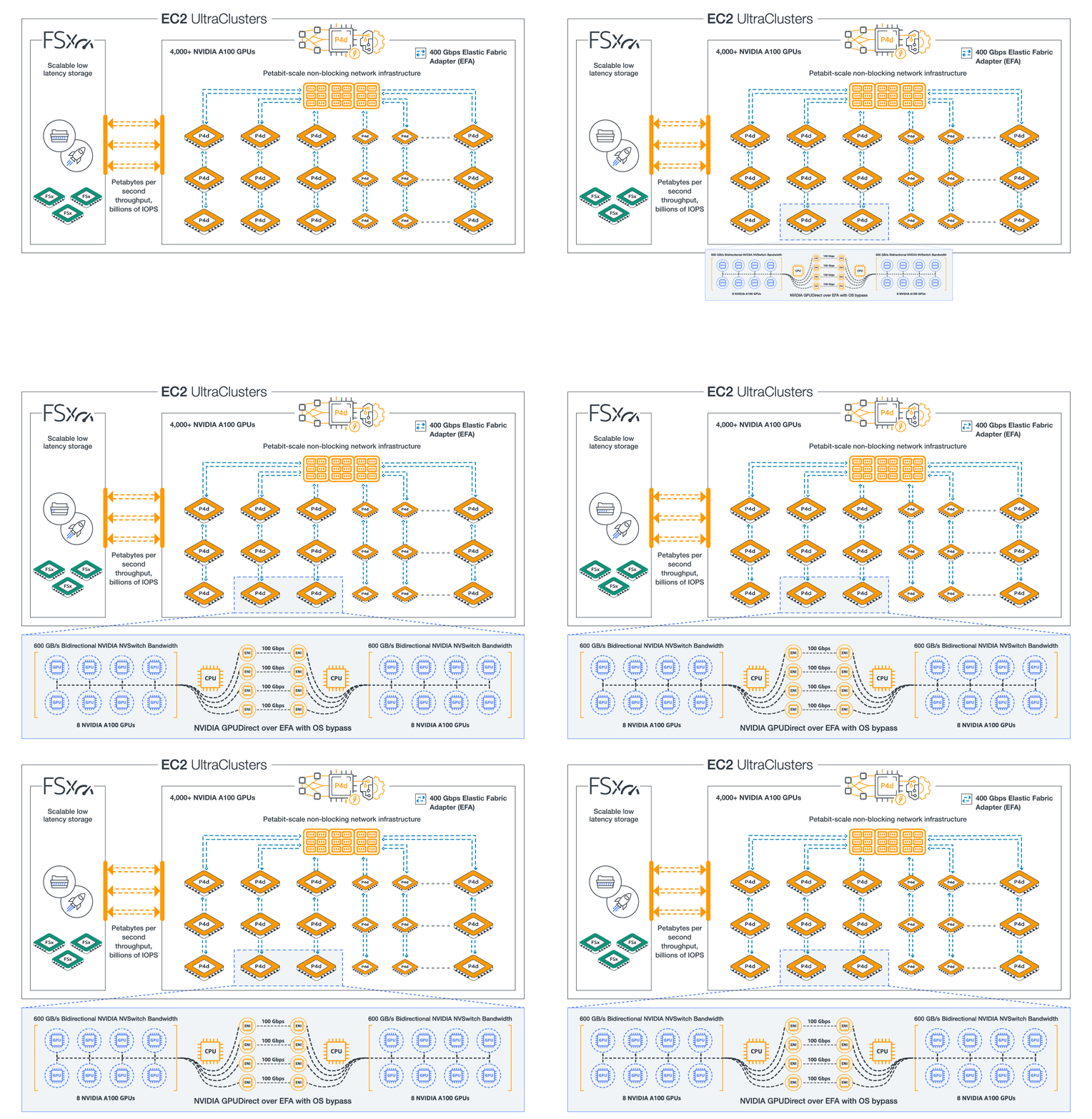
Diagram of P4d UltraClusters

P4d consists of 8 A100 GPUs, with 40GB GPU Memory each

P4de consists of 8 A100 80GB GPUs, with 80GB GPU memory each

Nvidia blog on HGX baseboard supporting 8 A100 GPUs – https://developer.nvidia.com/blog/introducing-hgx-a100-most-powerful-accelerated-server-platform-for-ai-hpc/

A100 80GB data sheet – https://www.nvidia.com/en-us/data-center/a100/

MIG support in A100 – https://developer.nvidia.com/blog/getting-the-most-out-of-the-a100-gpu-with-multi-instance-gpu/ and MIG user guide – https://docs.nvidia.com/datacenter/tesla/mig-user-guide

MIG support in AWS EC2 instance type P4d and in AWS EKS – https://developer.nvidia.com/blog/amazon-elastic-kubernetes-services-now-offers-native-support-for-nvidia-a100-multi-instance-gpus/

GCP A2 adds 16 A100 GPUs to a node – https://cloud.google.com/blog/products/compute/announcing-google-cloud-a2-vm-family-based-on-nvidia-a100-gpu

https://cloud.google.com/blog/products/containers-kubernetes/gke-now-supports-multi-instance-gpus

Running more pods/gpu on EKS with MIG – https://medium.com/itnext/run-more-pods-per-gpu-with-nvidia-multi-instance-gpu-d4f7fb07c9b5

Nvidia Embraces The CPU World With “Grace” Arm Server Chip

EC2 Trainium UltraClusters

Each EC2 Trn1 instance has

  • up to 16 AWS Trainium accelerators purpose built to accelerate DL training and deliver up to 3.4 petaflops of FP16/BF16 compute power. Each accelerator includes two second-generation NeuronCores
  • 512 GB of shared accelerator memory (HBM) with 9.8 TB/s of total memory bandwidth
  • 1600 Gbps of Elastic Fabric Adapter (EFAv2)

An EC2 Trn1 UltraCluster, consists of densely packed, co-located racks of Trn1 compute instances interconnected by non-blocking petabyte scale networking. It is our largest UltraCluster to date, offering 6 exaflops of compute power on demand with up to 30,000 Trainium chips.

https://aws.amazon.com/blogs/machine-learning/scaling-large-language-model-llm-training-with-amazon-ec2-trn1-ultraclusters/

Hugging Face – AI models and datasets hub

Hugging Face supports around 100,000 pre-trained language models that can be used for various NLP tasks. The Hugging Face transformers library, which is a popular choice for NLP tasks such as text classification and machine translation, currently supports over 100 pre-trained language models. These models include popular models such as BERT, GPT-2, and RoBERTa. In addition Hugging Face provides tools and libraries that allow users to fine-tune and customize these models for specific tasks or datasets.

The datasets can be loaded using the python datasets package (pip install datasets). An overview is here.

A Hugging Face Course – https://github.com/huggingface/course

Hugging Face on AWS blog – https://aws.amazon.com/blogs/machine-learning/aws-and-hugging-face-collaborate-to-simplify-and-accelerate-adoption-of-natural-language-processing-models/

CEO Clement Delangue, calls it the “GitHub of machine learning.” Its emphasis on an open, collaborative approach that made investors confident in the company’s $2 billion valuation, he said. “That’s what is really important to us, makes us successful and makes us different from others in the space.” 

DistilBERT is a smaller, faster, and cheaper version of the BERT language model developed by Hugging Face by controlling the loss function during training of a ‘student model’ from a ‘teacher model’. It bucks the trend towards larger models, and instead focusses on training a more efficient model. It has been “distilled” to reduce its size and computational requirements, making it faster to train and more efficient to run. Despite being smaller than BERT, DistilBERT is able to achieve similar or even slightly better performance on many NLP tasks. The triple loss function is devised to include a distillation loss, a training loss and a cosine-distance loss.

Examples of generative models available on the Hugging Face platform include:

  1. GPT-2: GPT-2 (Generative Pre-training Transformer 2) is a large-scale language model developed by OpenAI that can be used for tasks such as language translation and text generation.
  2. BERT: BERT (Bidirectional Encoder Representations from Transformers) is a language model developed by Google that can be used for tasks such as language translation and text classification.
  3. RoBERTa: RoBERTa (Robustly Optimized BERT Approach) is a language model developed by Facebook that is based on the BERT model and can be used for tasks such as language translation and text classification.
  4. T5: T5 (Text-To-Text Transfer Transformer) is a language model developed by Google that can be used for tasks such as language translation and text summarization.
  5. DistilBERT, described above. To generate text with DistilBERT, you would typically fine-tune the model on a specific task, such as machine translation or language generation, using a dataset that is relevant to the task. Once the model has been fine-tuned, you can use it to generate text by providing it with a prompt or seed text and letting it predict the next word or sequence of words.

Docs on text generation – https://huggingface.co/transformers/v3.1.0/main_classes/model.html?highlight=generate

Here’s an example of using transformers to generate some text.

import transformers

# Load the model and tokenizer
tokenizer = AutoTokenizer.from_pretrained('distilgpt2') 
model = AutoModelWithLMHead.from_pretrained('distilgpt2')  

# Encode the prompt
input_context_prompt = "Men on the moon "
input_ids = tokenizer.encode(input_context_prompt, return_tensors='pt')  # encode input context

# Generate text
outputs = model.generate(input_ids=input_ids, max_length=40, temperature=0.9, num_return_sequences=10, do_sample=True)  

# Sample candidate outputs and print
for i in range(10): #  10 output sequences were generated
    print('Generated {}: {}'.format(i, tokenizer.decode(outputs[i], skip_special_tokens=True)))

Note the temperature parameter during model.generate(). A temperature of zero means the generation process will choose the most likely next word . A higher temperature allows for less likely words to be included in the generation process.

Machine Learning Security

Seven security concerns in Machine Learning (ML) –

  1. Data privacy and security: ML requires large amounts of data to be trained, and this data may contain sensitive or personal information. Appropriate measures need to be put in place to prevent data from being accessed by unauthorized parties.
  2. Notebooks security: ML typically requires Jupyter or similar notebooks to be served for data scientists to work on data, code, and models, both individually and collaboratively. These notebooks need to be access controlled and protected from unauthorized access. This includes the code and git repos that host the code, and the model artifacts that the notebook uses or creates.
  3. Model serving and inference security: ML models in production are commonly served and accessed over inference endpoints and such endpoints need authentication, authorization, encryption for protection against misuse. During model upgrades to an endpoint or changes to an endpoint and its configuration, a number of attacks are possible that are typical of a devops/devsecops pipeline. These need to be protected against.
  4. Model security: Models can be vulnerable to attacks such as adversarial inputs, such as when an attacker intentionally manipulates the input to the model in order to cause it to make incorrect predictions. Another example is when the model makes an egregiously bad decision on an input, for example a self-driving car hitting an obstacle instead of avoiding it. It is important to harden the model and bound the decisions that come from its use.
  5. Misuse: Even if a model works as designed, it can be misused, for example by generating fake or misleading content. It is important to consider the potential unintended consequences of using models and to put safeguards in place to prevent their misuse.
  6. Bias: ML models can sometimes exhibit biases due to the data they are trained on. There should be a plan to identify biases in a model and take steps to mitigate them.
  7. Intellectual property: ML models may be protected by intellectual property laws, and it is important to respect these laws and obtain the appropriate licenses when using language models developed by others.

Multimodal neurons typographic attacks

https://openai.com/blog/multimodal-neurons/

ML Training on images and text together leads to certain neurons holding information of both images and text – multimodal neurons.

When the type of the detected object can be changed by tricking the model into recognizing a textual description instead of a visual description- that can be called a typographic attack.

Intriguing concepts indicating that a fluid crossover from text to images and back is almost here.

There are a few potential security concerns to consider when working with language models:

  1. Data privacy: Language models often require large amounts of data to be trained, and this data may contain sensitive or personal information. It is important to ensure that this data is protected and that appropriate measures are in place to prevent it from being accessed by unauthorized parties.
  2. Model security: Language models can be vulnerable to attacks such as adversarial examples, in which an attacker intentionally manipulates the input to the model in order to cause it to make incorrect predictions. It is important to consider the security of the model and take steps to protect it against these types of attacks.
  3. Misuse: Language models have the potential to be misused, for example by generating fake or misleading content. It is important to consider the potential unintended consequences of using language models and to put safeguards in place to prevent their misuse.
  4. Bias: Language models can sometimes exhibit biases due to the data they are trained on. It is important to consider the potential biases in a model and take steps to mitigate them.
  5. Intellectual property: Language models may be protected by intellectual property laws, and it is important to respect these laws and obtain the appropriate licenses when using language models developed by others.

Processors for Deep Learning: Nvidia Ampere GPU, Tesla Dojo, AWS Inferentia, Cerebras

The NVidia Volta-100 GPU released in Dec 2017 was the first microprocessor with dedicated cores purely for matrix computations called Tensor Cores. The Ampere-100 GPU released May’20 is its successor. Ampere has 84 Streaming Multiprocessors (SMs) with 4 Tensor Cores (TCs) each for a total of 336 TCs. Tensor Cores reduce the cycle time for matrix multiplications, operating on 4×4 matrices of 16bit floating point numbers. These GPUs are aimed at Deep Learning use cases which consist of a pipeline of matrix operations.

Here’s an article on choosing the right EC2 instance type for DL – https://towardsdatascience.com/choosing-the-right-gpu-for-deep-learning-on-aws-d69c157d8c86 (G4 for inferencing, P4 for training).

How did the need for specialized DL chips arise, and why are Tensors important in DL ? In math, we have Scalars and Vectors. Scalars are used for magnitude and Vectors encode magnitude and direction. To transform Vectors, one applies Linear Transformations in the form of Matrices. Matrices for Linear Transformations have EigenVectors and EigenValues which describe the invariants of the transformation. A Tensor in math and physics is a concept that exhibits certain types invariance during transformations. In 3 dimensions, a Stress Tensor has 9 components, which can be representated as a 3×3 matrix; under a change of basis the components of the tensor change however the tensor itself does not.

In Deep Learning applications a Tensor is basically a Matrix. The Generalized Matrix Multiplication (GEMM) operation, D=AxB+C, is at the heart of Deep Learning, and Tensor Cores are designed to speed these up.

In Deep Learning, multilinear maps are interleaved with non-linear transforms to model arbitrary transforms of input to output and a specific model is arrived by a process of error reduction on training of actual data. This PyTorch Deep Learning page is an excellent resource to transition from traditional linear algebra to deep learning software – https://pytorch.org/tutorials/beginner/nlp/deep_learning_tutorial.html .

Tesla Dojo is planned to build a processor/computer dedicated for Deep Learning to train on vast amounts of video data. Launched on Tesla AI Day, Aug’20 2021, a video at https://www.youtube.com/watch?v=DSw3IwsgNnc

AWS Inferentia is a chip for deep learning inferencing, with its four Neuron Cores.

AWS Trainium is an ML chip for training.

Generally speaking the desire in deep learning community is to have simpler processing units in larger numbers.

Updates: Cerebras announced a chip which can handle neural networks with 120 trillion parameters, with 850,000 AI optimized cores per chip.

SambaNova, Anton, Cerebras and Graphcore presentations are at https://www.anandtech.com/show/16908/hot-chips-2021-live-blog-machine-learning-graphcore-cerebras-sambanova-anton

SambaNova is building 400,000 AI cores per chip.

NVIDIA GPUAWS InstanceAzure Instance
M60G3
T4G4NVv4
V100P3NCv4
A100P4, P4dNDv4

https://lambdalabs.com/blog/nvidia-a100-vs-v100-benchmarks